
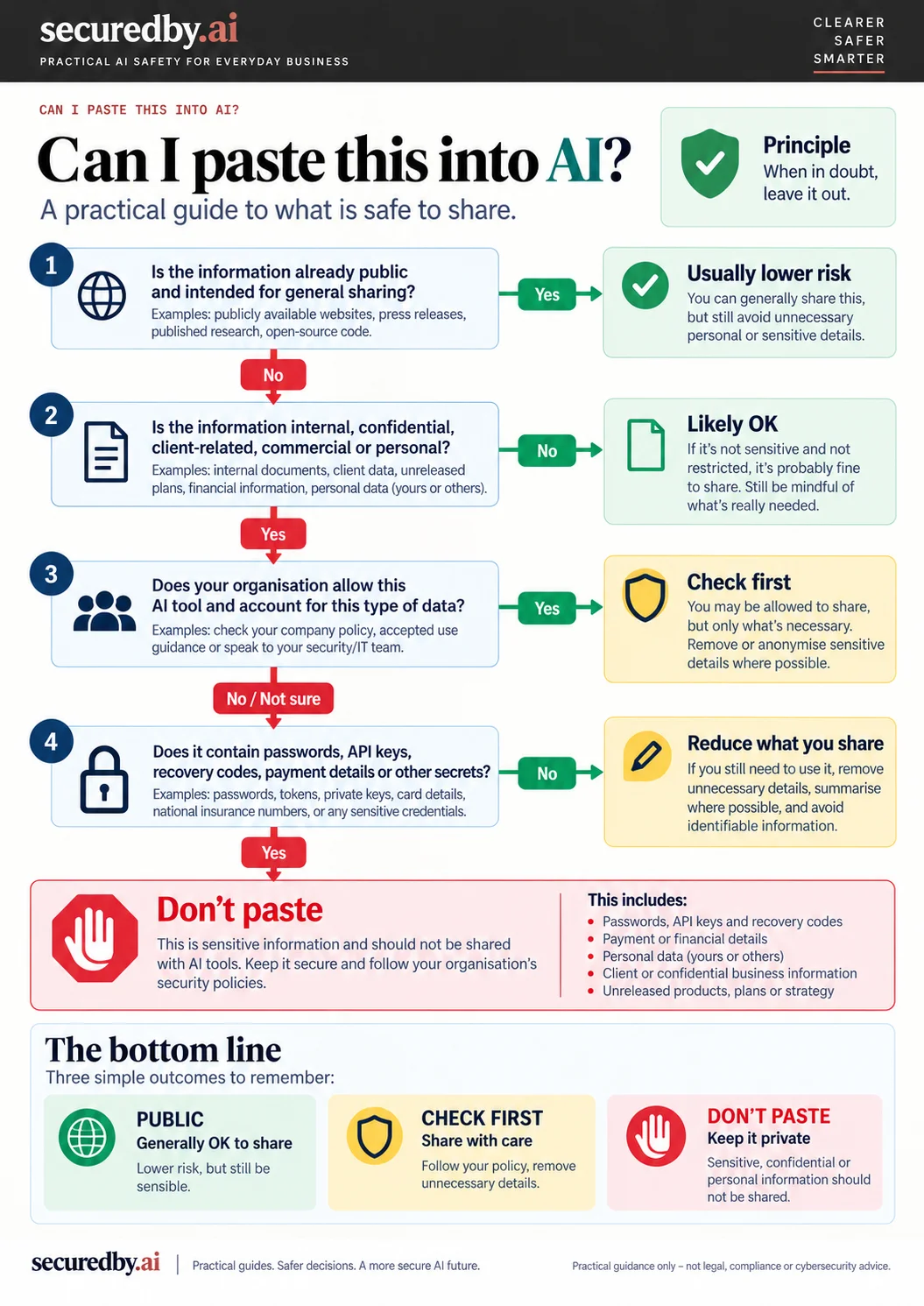
AI tools are now part of everyday work. People use them to rewrite emails, summarise meetings, review contracts, draft proposals, analyse spreadsheets and brainstorm ideas.
The difficult question is often not “Can the AI do this?” but “Should I put this information into it?”
There is no single answer that works for every tool, account or organisation. The right decision depends on the type of information, your company rules, the AI product you are using, the plan or account you are signed into, and the privacy and data settings that apply.
This guide is a practical starting point for normal business use. It is not legal, compliance or cybersecurity advice.
Start with two questions
Before pasting anything into an AI tool, ask:
- Am I allowed to share this information with this service?
- Do I understand how this particular account handles the data?
Those two questions are more useful than assuming that one AI brand is simply “safe” or “unsafe”.
A personal account and a managed business account from the same provider can have very different data-handling commitments. Settings can matter too.
Usually lower-risk to share
Some information is generally lower risk because it is already public, deliberately non-sensitive, or has been approved for external sharing.
Examples include:
- public website copy
- press releases
- published reports
- generic marketing ideas that contain no confidential detail
- non-sensitive brainstorming notes
- information your organisation has already approved for public use
- dummy or synthetic data created specifically for testing
Public does not automatically mean cleared. A public-looking document can still contain client names, comments, tracked changes, metadata or internal notes that were never meant to be shared with another service.
Share only the minimum information the task actually needs.
Check first
This is the category most everyday business material falls into.
Examples include:
- internal business information
- client material
- meeting notes
- contracts
- commercial terms
- unpublished plans
- sales data
- staff information
- financial information
- documents from connected cloud services
Check first: business AI protections can be stronger than consumer-account protections, but they do not replace your own organisation’s rules, client obligations or data classifications.
None of these categories is automatically forbidden. But before sharing them, check your organisation’s policy and the controls that apply to the AI account you are using.
If your organisation does not yet have a written AI policy, a sensible default is to treat an AI service much like another external service or contractor: do not send internal, client or personal information unless someone with the right authority has approved the use and the account controls have been checked.
According to current vendor documentation, several major providers make stronger default commitments for business or enterprise products than for consumer accounts. OpenAI says data from ChatGPT Business, Enterprise, Edu and its API platform is not used to train its models by default. Anthropic says inputs and outputs from its commercial products, including Claude for Work and the API, are not used to train its generative models by default. Google says qualifying Workspace editions with Gemini do not use prompts, Workspace content or responses to train generative AI models outside the domain without permission. Microsoft says prompts, responses and Microsoft Graph data covered by enterprise data protection are not used to train its foundation models.
Those statements are tier-specific vendor commitments, not a general guarantee about every product carrying the same brand name. Workspace settings, feedback or improvement programmes, retention rules, administrator controls and integrations can also affect how data is handled.
And “not used for training” is not the same as “not stored, logged, accessible for support or security purposes, or processed by subprocessors.” Training is only one part of the data-handling question.
Vendor promises also do not remove your own legal, regulatory, contractual or professional responsibilities. If information includes personal data, regulated records or material covered by confidentiality duties, the question is not only how the AI provider handles it, but whether you are allowed to send it there in the first place.
Do not share by default
Some information should normally stay out of a general AI chat unless there is a specific approved workflow designed to handle it.
Examples include:
- passwords or login credentials
- payment card details
- private keys, recovery codes or authentication secrets
- highly sensitive personal data
- confidential information you are not authorised to disclose
- security credentials or production secrets
- information whose disclosure would breach a contract, policy or legal obligation
A practical test is: if you would not send the material to an outside contractor without first checking the contract, permissions or safeguards, do not paste it into a general AI chat without doing the same checks.
Connected apps change the boundary
AI tools increasingly connect to email, documents, calendars, CRM systems, code repositories and other business services. The same issue becomes more important with AI agents that can act across connected systems rather than simply answer a prompt.
That changes the question from “What did I paste?” to “What can the AI access?”
Before enabling a connector or agent, check:
- what data it can read
- whether it can write or take actions
- whether access can be limited to specific folders, projects or systems
- whether third-party services receive any of the data
A connector can also move information into another service with its own privacy, retention and security rules. The safest approach is usually least privilege: give the AI only the access needed for the task, not broad access simply because it is convenient.
Consumer and business accounts are not the same thing
This is one of the easiest things to miss.
With consumer AI products, training, retention and review can depend on product settings and the way the service is used. Those defaults and controls can change, so check the current settings rather than relying on what was true a year ago. Business, enterprise and API products may apply different defaults and contractual commitments.
For example, OpenAI provides controls for consumer ChatGPT accounts and says Temporary Chats are not used to improve its models. Google’s Gemini Apps Privacy Hub explains how activity settings affect whether chats are saved and used to improve Google services, and notes that some data may be reviewed by people. Anthropic’s consumer privacy guidance explains how settings and user choices affect whether chats and coding sessions can be used to improve Claude.
Do not rely on the logo alone. Check whether you are using a personal account, a company-managed account, an enterprise workspace or an API integration, and check the current settings that apply to that account.
A practical five-step check
When you are unsure, use this quick sequence:
1. Identify the information
Start with the three buckets in this guide: is it deliberately public/non-sensitive, internal/client-related, or a credential/highly sensitive secret?
2. Check whether sharing is allowed
Would your organisation or client be comfortable with this information being sent to an outside service under the terms that apply to your account?
3. Check the account
Are you using a personal AI account or an organisation-managed business account?
4. Check the relevant controls
Look at data-use settings, retention, training defaults, administrator controls and connected apps.
5. Reduce what you share
Remove names, client identifiers, secrets or unnecessary detail if the task can still be completed without them.
Redaction helps, but it is not magic
Replacing a client name with “Client A” is useful, but genuine anonymisation can be harder than it looks.
A contract, meeting transcript or dataset may still reveal an organisation or person through job titles, dates, locations, project names, unusual figures or combinations of details. A model or retrieval system may be able to infer identity from the remaining facts even when the obvious name has gone.
Redaction is therefore best treated as risk reduction, not an automatic permission slip.
What about temporary or private modes?
Temporary or private chat modes can be useful because they may change history, retention or model-improvement behaviour.
But they do not override company policy, contractual duties or the sensitivity of the information itself. They also do not stop the provider from processing the prompt during the session, and they do not remove access already granted through connected files or services.
They do not necessarily mean “nothing is retained anywhere”. Providers may retain limited data for security, abuse prevention or legal reasons, and those details can change over time.
The simplest rule
If the information is deliberately public, non-sensitive and cleared for external sharing, using it with an approved AI tool is usually lower risk.
If it is internal, client-related, commercial or personal, check first.
If it is a password, payment credential, highly sensitive personal data, security secret, or confidential material you are not authorised to disclose, do not paste it into a general AI chat.
A note on changing products
AI products change quickly. Privacy controls, plan names, retention periods and enterprise features can all change.
For this article, securedby.ai re-opened and reviewed the linked official vendor documentation on 14 September 2026. That means the source pages were checked on that date; it is not an independent audit or certification of the vendors’ systems or practices.
Recheck the provider documentation before making a high-stakes decision.